AI Voice Agents: What It Takes to Handle Real Phone Calls
Most voice agent demos hide the hard parts - turn-taking, latency, delay handling. Here's what it takes to deploy AI agents that handle real calls.
Your AI agent can browse the web, send emails, process documents, and manage databases. But can it answer a phone call?
For most teams building AI agents, voice is the final frontier. Not because the AI isn't capable - it is - but because phone calls operate under constraints that no other channel imposes. A text-based agent can take five seconds to respond and nobody notices. On a phone call, two seconds of silence feels like an eternity. The caller doesn't see a typing indicator. They hear nothing. And they hang up.
We've spent months building production voice capabilities for AI agents - real phone numbers, real callers, real conversations. Not browser-based demos, not simulated calls, not "press 1 for AI." Actual phone calls where the agent answers, listens, thinks, acts, and responds naturally.
Here's what we learned about what it actually takes.
Why Phone Calls Are Different From Every Other Channel
Before diving into implementation, it's worth understanding why voice is fundamentally harder than text-based channels like chat, WhatsApp, email, or Telegram. This isn't about "adding a speech layer" to an existing chatbot. The constraints are different at every level.
| Text Channels (Chat, WhatsApp, Email) | Voice (Phone Calls) | |
|---|---|---|
| Response time | Seconds acceptable - typing indicators buy you time | Sub-second expected - silence is failure |
| Formatting | Markdown, bullet points, links, images | Plain spoken language only |
| Error recovery | User re-reads the message, scrolls back | Caller can't scroll back - it's gone |
| Silence | Invisible to the user (they wait or switch tabs) | Painfully obvious - feels like the call dropped |
| Turn-taking | Trivial - messages are discrete units | Complex - interruptions, pauses, cross-talk |
| Agent "thinking" | Typing indicator | Dead air = caller hangs up |
| Lists and structure | Render beautifully | Must be spoken sequentially ("first... second... third...") |
| Numbers | "Your total is $1,247.50" | "Your total is one thousand two hundred forty-seven dollars and fifty cents" |
This table isn't academic. Every row represents a production bug we've encountered. An agent that returns **Bold text** in a chat response works fine. The same response on a phone call has the TTS engine literally saying "asterisk asterisk bold text asterisk asterisk." An agent that responds with a numbered list looks professional in WhatsApp. On a call, it sounds like a robot reading a spreadsheet.
The fundamental difference is that text is visual and persistent, while voice is temporal and ephemeral. Your design assumptions need to change completely.
The Voice Pipeline: How AI Phone Calls Actually Work
At a high level, every AI voice call follows the same pipeline:
1. Speech-to-Text (STT) - The caller speaks, and their audio is transcribed into text in real-time. Modern STT engines like Deepgram's Nova model handle this with remarkable accuracy, including support for dozens of languages.
2. Language Model (LLM) - The transcribed text is processed by a large language model that understands the context, decides what to do, and generates a response. This is where your agent's intelligence lives.
3. Text-to-Speech (TTS) - The LLM's text response is converted back into natural-sounding audio and played to the caller.
Simple, right? Three steps. But here's the catch: latency compounds across the chain. If STT takes 300ms, the LLM takes 800ms, and TTS takes 400ms, that's 1.5 seconds of dead air before the agent says a single word. Add network overhead and you're looking at 2+ seconds. On a phone call, that's the point where the caller says "Hello? Are you there?"
This latency chain is why most voice agent demos feel impressive but production deployments feel clunky. The demo is running on localhost with a fast model and a cooperative tester who waits patiently. Production has network latency, noisy audio, callers who interrupt mid-sentence, and an agent that sometimes needs 30 seconds to look something up.
Understanding this pipeline is essential because every production decision you make is fundamentally about managing latency and handling the gaps.
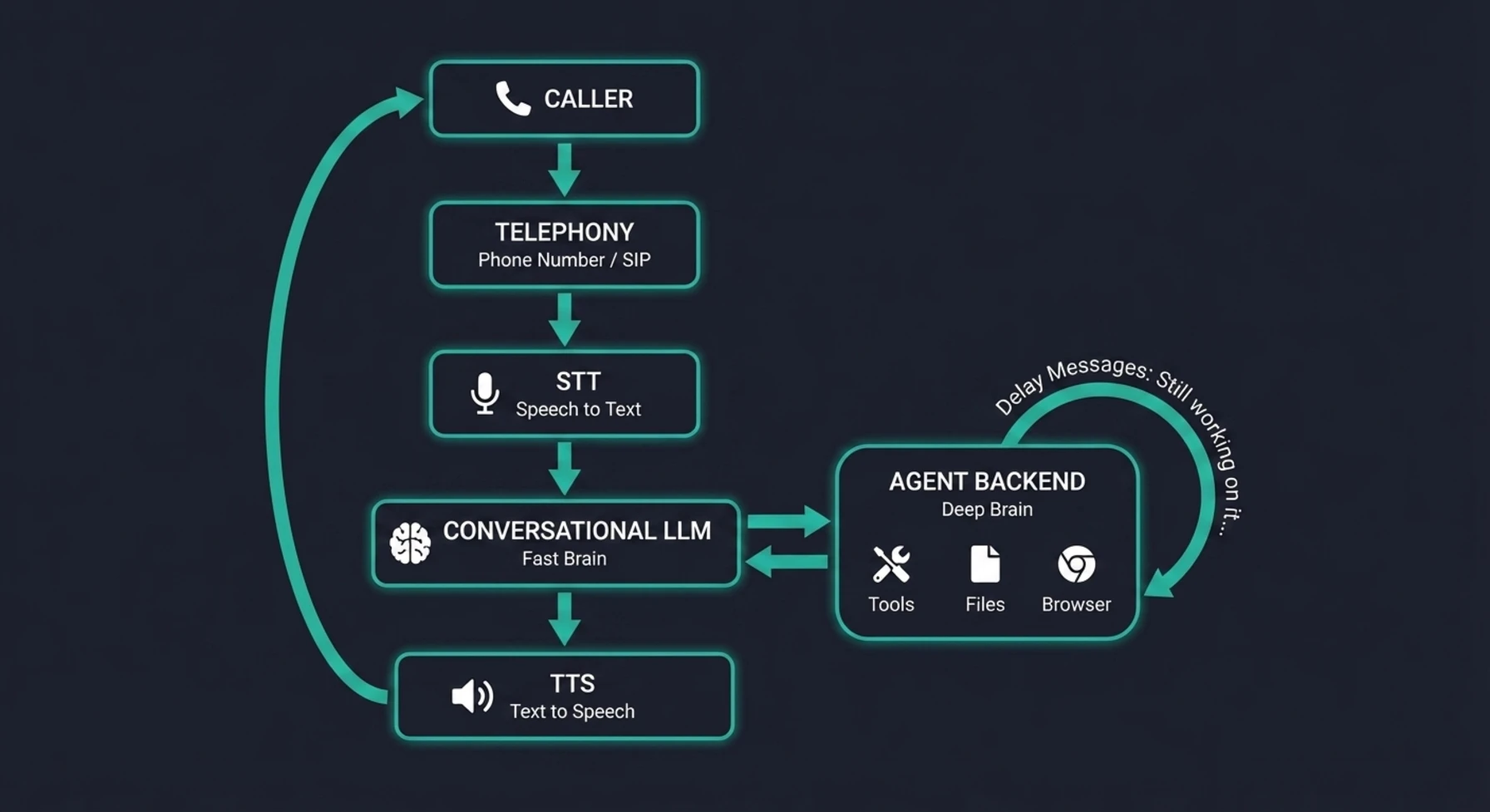
The diagram above shows the complete round-trip of a production voice call. Notice the two distinct "brains" - the fast conversational LLM handling real-time dialogue, and the deeper agent backend that executes actual work with tools, files, and browsers. The delay handling loop between them is what keeps the caller engaged while the agent works. Every component in this chain adds latency, and every millisecond matters.
The 8 Things That Separate a Demo From Production
After building and iterating on voice agents in production, we've identified eight capabilities that mark the difference between "impressive demo" and "something you can actually give to callers." Most voice agent tutorials cover the first two and ignore the rest.
1. A Real Phone Number, Not a Browser Widget
This sounds obvious, but most voice agent demos run as browser-based widgets - the user clicks a microphone button on a webpage, and the conversation happens over WebRTC. That's fine for testing. It's not how real people make phone calls.
A production voice agent needs an actual phone number. A number your customers can dial from their mobile phone, their desk phone, or their car's Bluetooth. A number that shows up in their call history. A number they can save in their contacts and call back later.
This means integrating with telephony providers that offer SIP trunking and real phone numbers - not just browser-based audio APIs. The number needs to be provisioned, configured with a webhook endpoint, and wired to your agent infrastructure so that when a call comes in, your system knows which agent should handle it.
2. Smart Turn-Taking
In a text conversation, messages are discrete. You type, you send, I respond. There's no ambiguity about whose turn it is.
Phone calls are nothing like this. People pause mid-sentence to think. They say "um" and "uh." They trail off. They interrupt. They start talking before you finish. A production voice agent needs to handle all of these gracefully.
The key mechanisms are:
- Endpointing - Detecting when the caller has actually finished speaking versus just pausing to think. Too aggressive and you cut them off. Too passive and there's an awkward gap after every sentence.
- Smart endpointing - Using AI to understand context when deciding if the caller is done. "I need to update my address to..." is clearly unfinished. "That's all I needed, thanks" is clearly done. The silence after each means something different.
- Wait time calibration - The milliseconds of silence before the agent starts responding. Too short and you interrupt. Too long and it feels laggy. We've found that around 1 second with smart endpointing enabled hits the sweet spot for most conversations.
Getting turn-taking wrong makes even the smartest agent feel unbearable to talk to. Getting it right makes the agent feel natural and attentive.
3. Delay Handling With Escalating Messages
This is the single biggest production insight we can share, and it's something almost no demo addresses: what happens when the agent needs time to do something?
In a text chat, the agent can take 10 or 20 seconds to process a complex request, and the user sees a typing indicator and waits. On a phone call, 10 seconds of silence is a lifetime. The caller will say "Hello?" after 3 seconds, assume the call dropped after 7, and hang up after 10.
The solution is escalating delay messages - a series of natural, progressively reassuring spoken messages that play automatically when the agent is working on something that takes time. For example:
- "Still checking. That could take a moment."
- "I'm still checking, please bear with me."
- "This is taking a bit longer than usual, still working on it."
- "Sorry about the wait - I want to make sure I get this right."
- "I appreciate your patience. Almost there, just a little longer."
The key is escalating gaps between messages. Early messages come faster because the caller's patience is freshest - a few seconds of silence already feels off. Later messages space out more because the caller has already committed to waiting. The tone escalates too: from casual acknowledgment, to gentle reassurance, to a genuine apology with context. This progression mirrors how a human agent would naturally handle the same situation - and that's exactly why it works.
This pattern is the difference between a caller hanging up and a caller feeling respected. The agent isn't apologizing for being slow - it's being transparent about doing real work. And when the actual response comes, the caller already knows the agent was working on it.
If the operation fails entirely, the agent says: "I'm having trouble processing that right now. Could you try asking again?" - honest, recoverable, and not a dead line.
4. Sandbox Pre-Warming
AI agents that can actually do things - browse the web, run code, check databases, manage files - need a working environment. We call this a sandbox: an isolated compute environment with the agent's tools installed and ready.
Starting a sandbox cold takes time. On a text channel, you can absorb that startup time. On a voice call, you can't. If the agent answers the phone and then spends 15 seconds spinning up its working environment before it can handle the first request, the experience falls apart.
The solution is pre-warming: starting the sandbox the moment the call connects, before the caller even asks their first question. While the agent is saying "Hi, how can I help you?" and the caller is explaining what they need, the sandbox is booting in the background. By the time the first actionable request comes in, the environment is warm and ready.
This is a small infrastructure optimization that has an outsized impact on the caller experience. The first tool call after a cold start might take 15–20 seconds. The same call with a pre-warmed sandbox takes 3–5 seconds. On a phone call, that difference is everything.
5. The Two-Brain Architecture
Here's a design pattern that emerged from necessity: you need two AI models working together on a voice call, not one.
Brain 1: The Conversational LLM - This is a fast, lightweight model that handles the real-time voice conversation. It manages greetings, small talk, clarifying questions, follow-ups, and the natural rhythm of a phone call. It runs on the voice platform and controls the STT → LLM → TTS loop with minimal latency. Its system prompt is slim - just identity, voice behavior rules, and awareness that it can hand off complex tasks.
Brain 2: The Agent Backend - This is your full agent pipeline with access to all the tools, credentials, files, skills, and context your agent needs to actually do things. It receives requests from Brain 1 (via a tool call), executes them using your complete infrastructure, and returns a plain-text result that Brain 1 speaks to the caller.
Why not just use one model? Because the requirements conflict:
- The conversational LLM needs to be fast (sub-second responses for turn-taking) and slim (small context window = low latency)
- The agent backend needs to be powerful (full context, all tools, complex reasoning) and thorough (it can take 30 seconds if needed to do the job right)
You can't optimize for both. A fast model with a tiny context can't do complex multi-step tasks. A powerful model loaded with every tool and credential can't respond in 200ms for conversational turn-taking.
The two-brain pattern lets each model do what it's best at. Brain 1 is the voice - natural, responsive, human-like. Brain 2 is the hands - capable, thorough, connected to everything. They work together through a clean handoff: Brain 1 recognizes when action is needed, delegates to Brain 2, and speaks the result.
6. Voice Output Formatting Rules
This seems like a small detail until it ruins a call. LLMs are trained on text. They naturally output markdown, bullet points, numbered lists, special characters, and abbreviations. All of those sound terrible when spoken aloud.
Your voice-facing model needs strict output rules:
- No markdown - "bold" becomes "asterisk asterisk bold asterisk asterisk"
- No emojis - "✅" becomes silence or "check mark" depending on the TTS
- Spell out numbers - "123" should be "one hundred twenty-three"
- Spell out abbreviations - "US" should be "United States" or "the U.S." with proper pausing
- Natural lists - "first... second... third..." instead of "1. 2. 3."
- Conversational structure - Short sentences, natural pauses, no walls of text
These rules need to be in the system prompt of your conversational model, not optional guidance. One markdown-formatted response is enough to break the caller's trust in the agent's competence.
7. Session Management Per Call
Text-based channels have flexible session models. A WhatsApp conversation can span hours or days, with messages flowing in whenever the user feels like it. Each message is a discrete event.
Phone calls are fundamentally different. A call is one continuous, real-time session. The agent needs to maintain context across the entire call - remembering what the caller said at minute 1 when they're asking a follow-up at minute 8. But it also needs to release resources cleanly when the call ends.
This means:
- One session per call - Not per-message, not per-question. The entire call shares one context.
- Persistent conversation history - Every transcript segment (both caller and agent) stored in order, available for context in subsequent turns.
- Clean session closure - When the call ends (whether normally or due to a disconnect), the session is marked complete, recording URLs are stored, costs are tallied, and resources are released.
- Fallback resolution - If the caller disconnects abruptly, the system still needs to find and close the right session. This requires multiple resolution strategies (metadata, caller ID lookup, conversation matching) because not every disconnect is clean.
8. Cost Awareness
Voice calls are expensive compared to text. Every second of a call has costs flowing through multiple systems simultaneously:
- STT cost - Transcribing the caller's audio in real-time
- LLM cost - The conversational model processing each turn
- TTS cost - Converting the agent's response back to speech
- Agent backend cost - When the agent needs to execute actions (your full LLM pipeline)
- Telephony cost - The per-minute cost of the phone number and call routing
These costs compound. A 10-minute call might cost $0.50–$2.00 depending on your model choices and how much action the agent takes. That's dramatically more than a WhatsApp conversation covering the same ground.
This has real implications for your architecture:
- Model selection matters for voice specifically. You don't need GPT-4 for conversational turn-taking. A faster, cheaper model handles greetings and simple questions, while the expensive model only runs when real agent work is needed.
- Max call duration limits are a safety net, not a nice-to-have. Without them, a confused caller or a stuck agent can rack up significant costs.
- Cost tracking per call - not just per-day or per-agent - is essential for understanding your unit economics.
Choosing Your Voice Infrastructure
There are three broad approaches to giving your AI agent a phone number, and they parallel the WhatsApp integration landscape in some interesting ways.
DIY (Twilio SIP + Custom Pipeline)
You provision a phone number via Twilio (or Vonage, Telnyx, etc.), receive raw audio streams via SIP/WebSocket, pipe them through your own STT service, process with your LLM, and send responses through your own TTS back to the audio stream.
Pros: Maximum control over every component. No vendor lock-in.
Cons: You're building a real-time audio processing system from scratch. Turn-taking, endpointing, echo cancellation, silence detection, audio codec handling - all your problem. Teams that go this route typically spend 3–6 months before their first production call.
Voice AI Platforms
Platforms like Vapi, Bland.ai, Retell, and LiveKit handle the telephony and audio pipeline - phone numbers, STT, TTS, turn-taking, and the real-time audio layer. You provide the intelligence via webhooks and API integrations.
Pros: You skip the hardest infrastructure problems (real-time audio, turn-taking, telephony) and focus on what makes your agent unique - its intelligence, tools, and capabilities. Time to first production call: days, not months.
Cons: You're dependent on the platform for audio quality, latency, and available features. Less control over the exact turn-taking behavior and TTS voice options.
Browser-Only Widgets
WebRTC-based solutions that work in a browser tab. No real phone number, no dial-in capability.
Pros: Quick to set up for demos and internal testing.
Cons: Not a real phone experience. Callers can't dial in from their phone. Useless for production customer-facing scenarios.
Our Recommendation
For most teams, the voice AI platform approach is the right choice. The real-time audio layer is incredibly hard to build well, and it's not where your competitive advantage lies. Your advantage is in what the agent can do - the tools it can access, the context it has, the actions it can take. Let the platform handle the audio pipeline and focus your engineering effort on the intelligence layer.
This is analogous to our recommendation for WhatsApp: use the official infrastructure (Meta's Cloud API for WhatsApp, a voice platform for phone calls) and invest your effort in the agent capabilities, not the communication plumbing.
A Production Checklist
If you're building voice capabilities for your AI agent, here's a practical checklist drawn from everything we've learned:
Before your first call:
- Real phone number provisioned and connected to your webhook endpoint
- STT language configured (auto-detect works for most languages - but not all. Test yours explicitly)
- Conversational model selected with voice-appropriate system prompt
- Voice output rules enforced (no markdown, spell out numbers, no emojis)
- Delay handling messages configured for long-running operations
- Max call duration limit set (prevent runaway costs)
- Sandbox pre-warming enabled for first-request performance
For production readiness:
- Turn-taking calibrated (test with real callers, not just yourself)
- Greeting message set (or dynamic greeting with caller name)
- Session management with clean closure on normal and abnormal disconnects
- Per-call cost tracking and credit deduction
- Call recording enabled for quality review and debugging
- Transcript storage for audit trail and conversation history
- Error responses that are honest and recoverable ("I'm having trouble with that - could you try again?")
Ongoing operations:
- Monitor average response latency per call
- Track call duration distribution (are callers getting what they need quickly?)
- Review call recordings for quality issues
- Tune turn-taking parameters based on real caller behavior
- Watch for cost anomalies (unexpectedly long calls, stuck sessions)
Where Voice Agents Are Heading
Voice is where AI agents become genuinely transformative for businesses. Text channels are powerful, but voice is universal. Everyone knows how to make a phone call. No apps to download, no interfaces to learn, no login screens.
The gap today is between what's possible in a demo and what's reliable in production. Most of that gap isn't about AI capabilities - models are already good enough for natural conversation. The gap is in the engineering: latency management, delay handling, session lifecycle, cost control, and all the infrastructure that makes the difference between "that was cool" and "that actually handled my request."
The teams that solve these engineering challenges first - that can deploy voice agents that work on real phone calls with real callers - will have a significant head start. Not because the AI is different, but because the infrastructure to support it in production is hard to get right and takes time to mature.
We're building this infrastructure because we believe AI agents should work wherever people already communicate. That includes WhatsApp, Telegram, email - and the phone. Especially the phone.
Communa's voice channel gives each AI agent its own phone number with production-grade call handling - smart turn-taking, delay management, sandbox pre-warming, and the two-brain architecture described above. If you're exploring voice for your agents, check out the voice setup guide or reach out to discuss your use case.