What Your AI Agent Does While You're Not Looking
Agents don't stop when you close the tab. Here's what you need to see - and why a change log for AI agents matters as much as git for code.

You step into a meeting. Your agent is running a follow-up campaign. You close the laptop to catch a flight, and the agent keeps answering customer emails. You're in a standup, and the agent is quietly updating its own skill because it just learned that a refund form has a new required field.
None of that is happening on your screen. And that's the point.
The whole pitch of autonomous agents is that they work without you watching. But "without you watching" is also the problem. The moment an agent runs for more than a few minutes - or, more interestingly, the moment more than one person on your team can edit it - you need a completely different category of tooling than the one you use for regular software. Not APM. Not uptime monitoring. Not "the logs".
You need to know what the agent did, what it cost, where it almost went wrong, and - the part almost nobody talks about - what the agent became while you weren't looking.
This post is about that second category. What to watch for, which six signals actually matter, and why having a clear history of every change to your agent - one you can scroll, compare, and undo - is quickly becoming the difference between "cool demo" and "running in production with a team".

The 6 Pillars of Runtime Observability
This isn't traditional APM. Agent observability cares less about latency and uptime, more about intent and outcome. Did the agent do the right thing, for the right reason, at the right cost? The answer lives across six signals, and every production agent team we've seen eventually builds some version of all six.
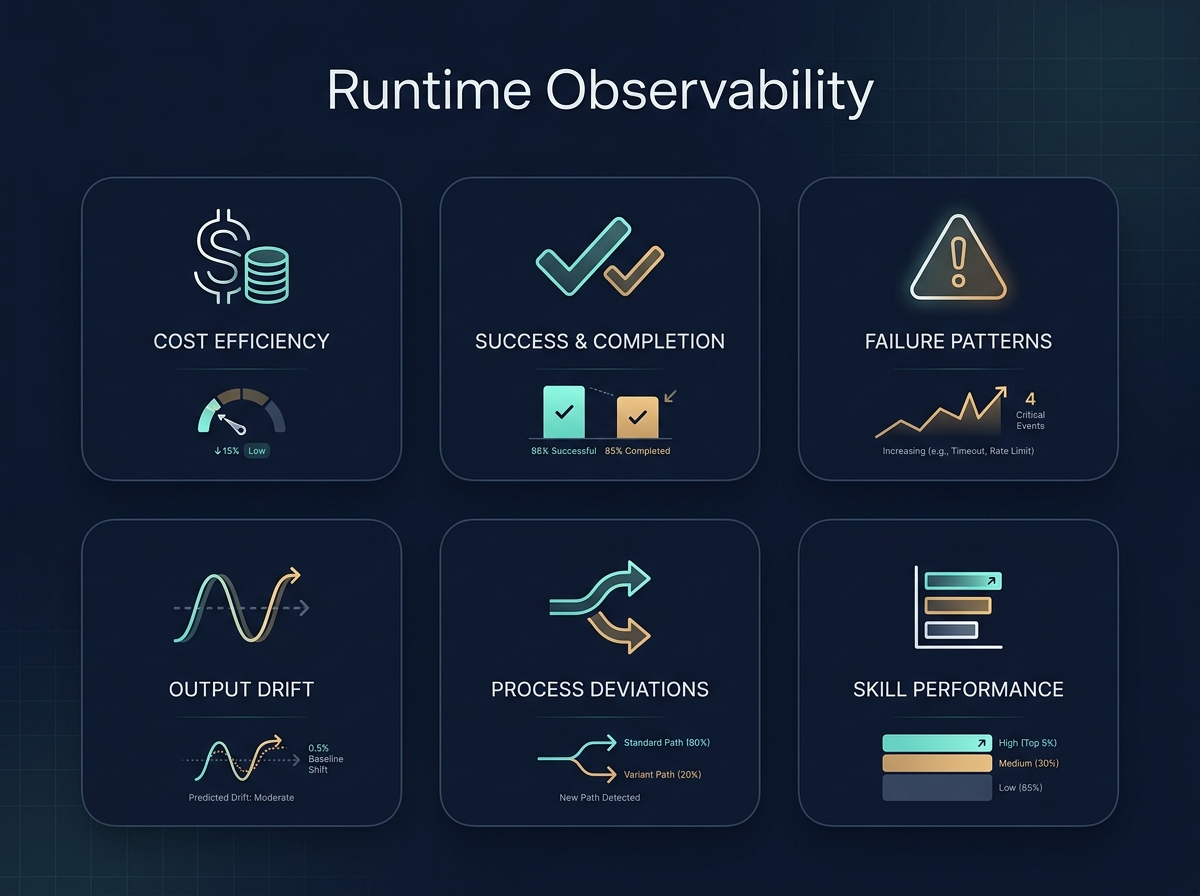
1. Cost per run (and per outcome)
The first number that will surprise you is cost. Not because agents are expensive in the abstract, but because the distribution is wildly uneven. One run might cost $0.02. The next run, on a superficially similar task, might cost $1.40 because the agent retried a tool call seven times and eventually escalated to a bigger model.
What you want is cost per run, cost per outcome (did this run produce anything useful?), and the tail of the distribution. The average cost lies. The 95th percentile tells you where your production bills are coming from.
2. Success vs. completed
These are not the same signal, and conflating them is the single most common mistake we see.
A run "completed" when the agent finished its loop without crashing. A run "succeeded" when it actually accomplished what it was asked to do. An agent can complete beautifully while confidently sending the wrong email to the wrong person. Completion is an infrastructure metric. Success is a product metric. You need both.
The practical version of this: every run should have an outcome tag that an evaluator (or the agent itself, or a lightweight review step) can set. "Sent refund", "escalated to human", "could not identify customer". Now you can graph success rate, not just completion rate, and the two lines will diverge in interesting ways.
3. Failure patterns
Individual failures are noise. Patterns of failure are signal.
"The agent failed on Tuesday at 14:03" is a ticket. "The agent fails 11% of the time when the email contains an attachment over 5MB" is a fix. The difference is grouping - by error type, by tool, by input shape, by time of day. If your observability only shows you the last 50 errors as a flat list, you will never see the pattern. Agent failures cluster, and the clusters are where the real bugs live.
4. Output drift
This is the one most teams miss for the longest time. The agent doesn't start failing on Tuesday. The agent starts changing its tone on Tuesday. Responses get longer. Or shorter. Or more formal. Or start including disclaimers they didn't include a week ago.
Drift is what happens when the inputs to your agent shift gradually - a new skill is added, an instruction is tweaked, a model is updated upstream, the customer base shifts. None of it is a failure. All of it changes the agent's behavior. You want a way to sample outputs over time and notice when the distribution moves, even when success rate looks stable.
5. Deviations from plan
Agents plan, then act. The interesting moments are when they don't do what they planned, or when they do something the plan didn't cover.
Sometimes this is the agent being smart - a user asked for X, but mid-run the agent realized Y was actually needed, so it pivoted. Sometimes it's the agent being confused. You can only tell which is which if you can see, per run, "here's what the agent intended, and here's what it actually did". Deviations aren't failures. They're the part of the run where judgment happened, and judgment is exactly what you want to inspect.
6. Skill performance
If your agent uses skills (scoped capabilities with their own instructions and tools), each skill is its own mini-product. It has a success rate. It has a cost profile. It has a failure mode.
The magic of tracking skills individually is that you stop debugging "the agent" and start debugging "the refund skill underperforms on Monday mornings when the queue is large". That's a fixable problem. "The agent is flaky" is not.
What the Agent Became: Git for Your Agent
Here's the shift that's harder to see from the outside. When you deploy regular software, the code doesn't edit itself, and your teammates don't silently push changes while you're in a meeting. With agents, both of those things happen. All the time.
Three forces are changing your agent in parallel:
-
The agent changes itself. Autonomous agents increasingly write their own skills, adjust their own instructions based on feedback, and refine their approach from past runs. That's the whole point of the "self-improving agent" paradigm - and it's already here.
-
You change the agent. You tweak an instruction. You add a credential. You rename a skill. Two weeks later you don't remember which of those changes caused the weird Tuesday behavior.
-
Your team changes the agent. This one is underrated. If your PM, your support lead, and your ops engineer can all edit the same agent, you have the exact same coordination problem that made git necessary for code - just without the git. Multiple well-intentioned people editing a shared artifact, each without full visibility into what the others changed.
Monday morning standup. Support complains the agent is "being too formal with customers". You check the skill - it looks fine. You open the change log. Last Thursday, your PM shortened the system instructions to make responses "more professional". Your support lead updated the tone guidance to "warmer". The agent now has two directives that almost-but-don't-quite align, and it picks whichever one triggers first. Neither change was wrong in isolation. You wouldn't have found this without a change log. You'd have found it through three days of Slack archaeology and a guess.
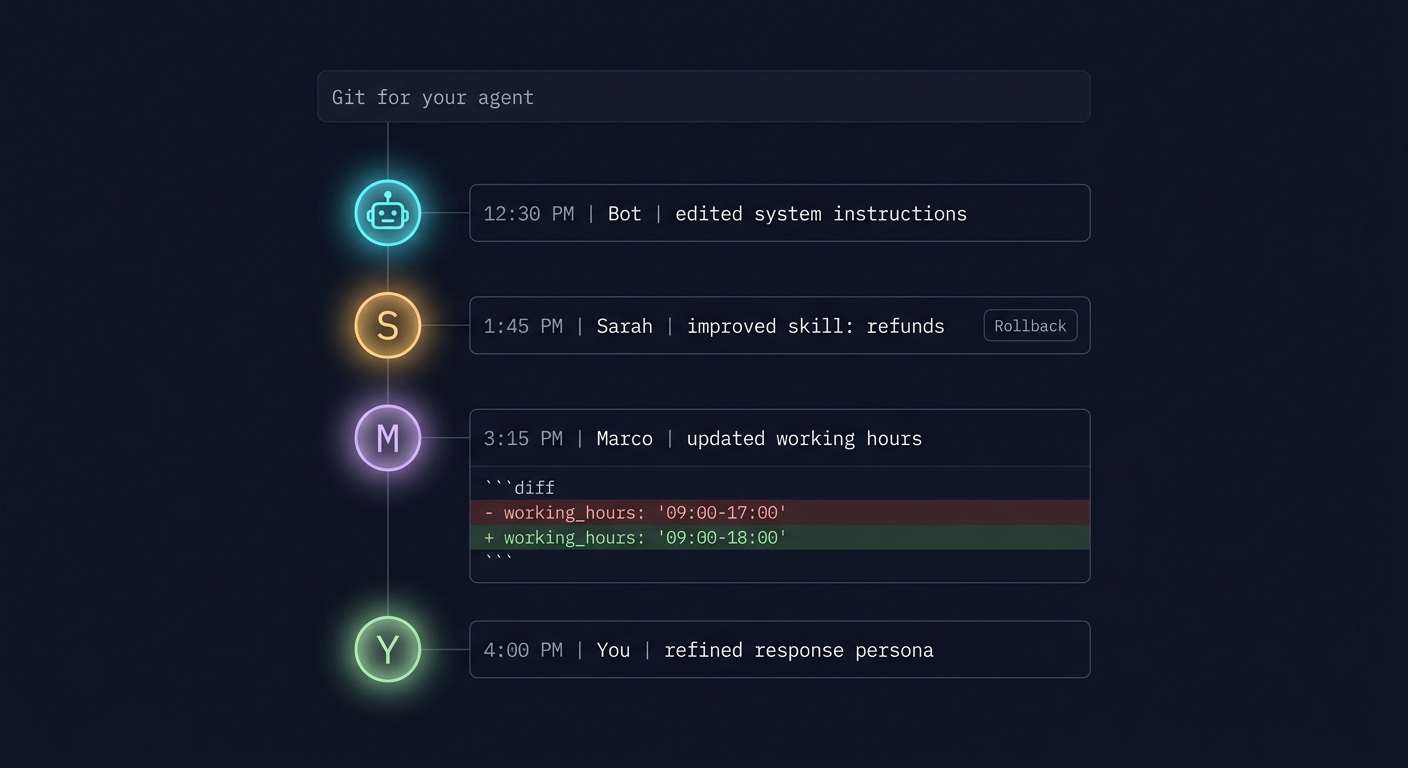
The answer is the same one developers worked out years ago for code: treat every edit to the agent as something you can see, compare, and undo. Specifically, that means four things working together:
- A clear before-and-after view. When an instruction or skill changes, you see the old version and the new version side by side, with the exact words that were added or removed highlighted - so you can read the difference in seconds, not paragraphs.
- One-click revert. If a change made the agent worse, you don't reopen the editor and try to remember what it used to say. You hit a button. The previous version comes back.
- A heads-up when something else moved underneath. If you go to undo Tuesday's edit but someone else has edited the same thing since, the system tells you that before you revert. No silent overwrites. You decide whether to roll back anyway or take a closer look first.
- Reverts are part of the history too. Rolling something back doesn't erase what happened. It shows up as its own entry in the timeline, with who did it and when, so the story of the agent stays complete.
Apply that to the Monday morning standup story: the support lead opens the change log, sees the PM's edit from last Thursday with the exact words that changed, and rolls it back in one click. The rollback shows up as a new entry in the timeline. The PM can see what was undone and why. No Slack archaeology, no guessing, no hard feelings.
Once this is in place, three things get noticeably easier:
- Debugging. "Why is the agent behaving differently than yesterday?" stops being a philosophical question and becomes a 30-second lookup.
- Trust. You can hand the agent to a new teammate and they can see the last 30 days of its life in one view. Onboarding to an agent becomes as routine as onboarding to any other shared tool.
- Autonomy with a seatbelt. You can let the agent modify itself, because you can always see exactly what it changed and undo it if you don't like the result.
If you take one thing from this post, take this: as soon as more than one person (or the agent itself) can edit your agent, a real change history stops being a "nice monitoring feature" and becomes baseline infrastructure.
The Frontier: Self-Improving Agents
The observability picture gets even more interesting when the agent itself is one of the actors editing the system.
Self-improving agents are the direction everyone is heading. An agent runs a task, notices it failed or underperformed, proposes a change to its own skill or instructions, and - with some evaluation step in the middle - promotes the change or rolls it back. Benchmarks like AgentBench are making this kind of continuous, automated evaluation feel normal, and you'll see it show up in production agent platforms over the next year.
The loop looks like this: run → measure → propose change → evaluate against a benchmark → promote or reject.
This is thrilling and slightly terrifying in equal measure. Thrilling because it's genuine autonomy - your agent gets better without you. Terrifying because without the right visibility, "the agent got better" is indistinguishable from "the agent silently optimized for the wrong thing".
The way out is to pair two things that most teams treat separately. Continuous evaluation keeps score - it tells you, run after run, whether the agent is actually getting better or quietly getting worse. A real change history keeps receipts - it tells you exactly what changed, who or what changed it, and lets you undo any of it with one click. On their own, each is useful. Together, they form a closed loop: the agent (or a teammate) makes a change, evaluations measure whether it helped, and if the score drops, the same revert button a person would use puts the agent back to its previous version. That loop is what turns "we have an autonomous agent" into "we have an autonomous agent we trust to run for months". For long-running, high-performing agents, this is the setup.
Practical Patterns + Checklist
A few patterns we've seen work well in teams running agents in production:
- Treat every run as a record, not an event. Store the inputs, the plan, the actions, the outputs, the cost, and the outcome tag. A run you can't inspect later is a run you can't learn from.
- Tag outcomes, not just completions. The cheapest version: a small set of outcome labels the agent picks at the end of every run. The richest version: a separate evaluator run that scores it.
- Put a return-to-desk view in front. When you come back to your laptop, the first screen should answer: what did the agent do today, what did it cost, what changed, and is anything stuck? Five seconds of reassurance beats five minutes of log diving.
- Treat your agent like shared infrastructure. If more than one person can edit it, you need change history the same way you need it for code. "Who changed the prompt?" should take five seconds to answer, not a Slack excavation.
- Give the agent room to change itself, but always with a rollback. Self-modification without a change log is chaos. Self-modification with a change log is just a very fast intern.
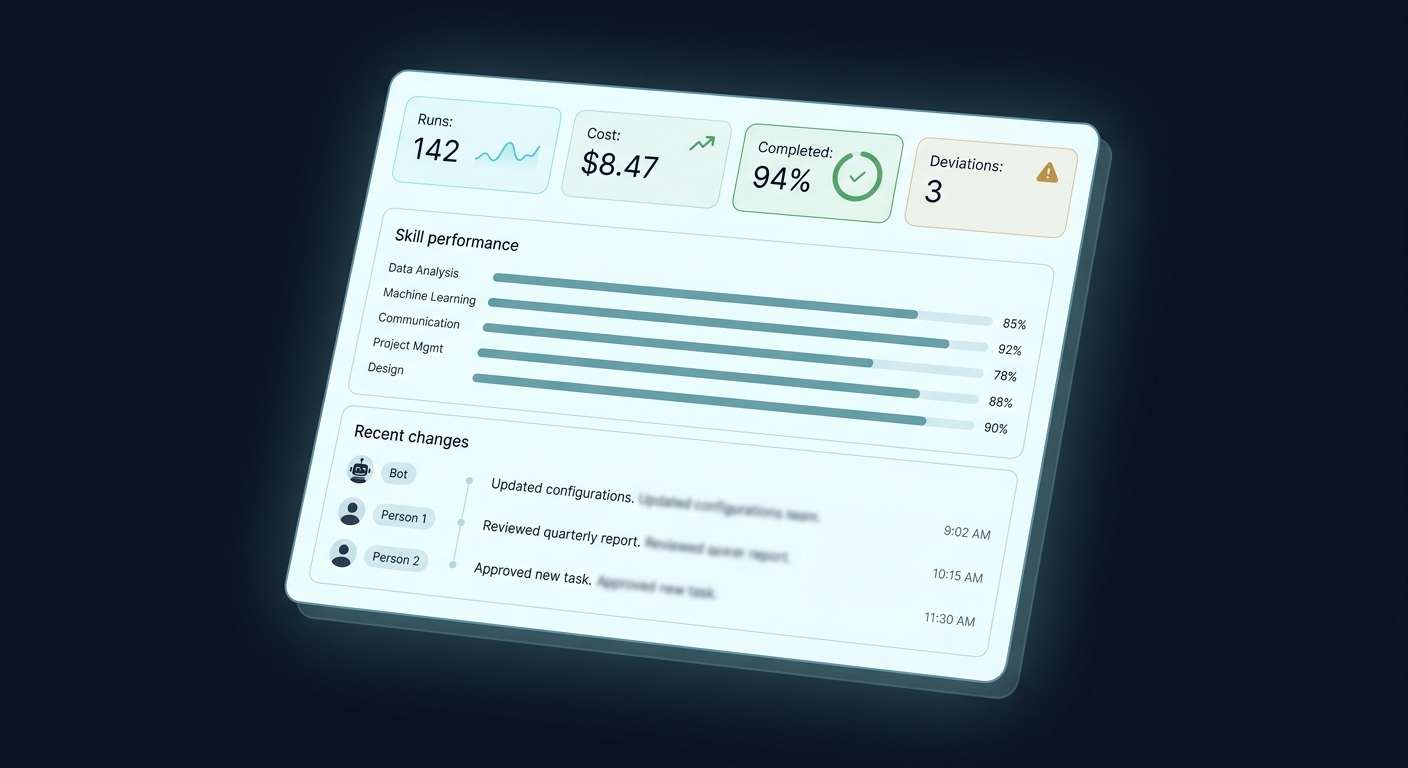
And a compact checklist you can use to sanity-check your own setup:
- Can I see cost per run and the cost distribution tail, not just averages?
- Do I track success separately from completion, with real outcome tags?
- Are failures grouped into patterns, not shown as a flat list?
- Do I have any mechanism at all for noticing output drift?
- Can I see, per run, where the agent deviated from its plan?
- Is each skill observable as its own mini-product?
- If my teammate or the agent itself edited a skill an hour ago, can I see exactly what changed - word by word - and roll it back with one click, even if something else changed in the meantime?
- If my team grows tomorrow, can a new teammate see the last 30 days of agent changes and understand how it got to its current state?
If most of those are "not really" today, that's fine - most teams start there. But each one you light up makes the agent feel a little less like a black box and a little more like a colleague you trust.
Where This Is Going
The short version: the teams that win with agents won't be the ones with the best prompts. They'll be the ones who can actually see what their agents are doing, what they're costing, and how they're changing over time - solo and as a team. Autonomy is only useful when it's legible.
Communa was built around this idea. Every agent has full runtime observability across the six pillars above, a complete change history with clear before-and-after views, one-click revert (even when something else has shifted underneath), and rollbacks that are themselves part of the timeline - plus continuous evaluation, so self-improving agents can modify themselves safely and any change that quietly makes things worse can be caught and undone before it becomes a problem.
If you're starting to feel the "I can't see what my agent is doing" problem - solo or with a team - take a look around or get in touch. We've been living in this problem for a while, and we'd love to compare notes.