Long-Running AI Agents: What Nobody Tells You
The gap between a 30-second AI agent demo and a 3-hour production run isn't about better prompts - it's rethinking time, failure, and trust.

Every AI agent demo tells the same story. Someone types a prompt, the agent does something clever in 30 seconds, and the room is impressed.
Then you try it in production. You hand the agent real work - processing a week's worth of data, migrating records across systems, handling a queue of customer requests. And within minutes, something breaks. Not the AI. The infrastructure underneath it.
The gap between a demo and a production system isn't about smarter prompts or bigger context windows. It's about the four fundamental assumptions you need to unlearn about how software works when an AI agent is the one running it.
We learned this the hard way. Over months of building Communa - a platform where AI agents run autonomously for hours at a time - we hit every wall there is to hit. Most of those walls had nothing to do with AI and everything to do with how we thought about systems.
This post isn't about our specific architecture. It's about the thinking that got us past those walls. If you're building AI agents that need to do real work (not just demo work), these are the questions you should be asking yourself before you write a single line of infrastructure code.
The Real Problem: Time Is the Enemy
Here's something that surprises most teams when they first try to build long-running agents: modern cloud infrastructure was not designed for long tasks.
Serverless platforms, edge functions, managed hosting - they all assume your code will finish quickly. A few seconds for an API call. Maybe a few minutes for a heavy computation. But 30 minutes? An hour? Three hours? That's not what these platforms were built for, and they will actively work against you.
Functions get killed after timeout limits. HTTP connections drop. Compute environments are recycled. Everything about the modern cloud stack assumes your work is short and stateless.
AI agents are the opposite. They're long and deeply stateful. An agent processing a queue of tasks accumulates context, makes decisions based on previous results, and operates on a working environment (files, databases, running applications) that must persist across its entire run.
This isn't a bug you can patch. It's a fundamental mismatch between how cloud platforms work and what AI agents need to do. And recognizing this mismatch is the first step toward solving it.
Mindset Shift 1: The Relay Race, Not the Marathon
The most important realization we had was this: you can't run a marathon on a sprint track. But you can run a relay.
When we stopped trying to make a single process survive for hours and instead designed for graceful handoffs between short-lived processes, everything changed.
Think of it like a factory shift change. The night shift doesn't start from scratch every morning - they read the handoff notes, check the state of the production line, and pick up exactly where the previous shift left off. The work is continuous even though the people on the floor rotate.
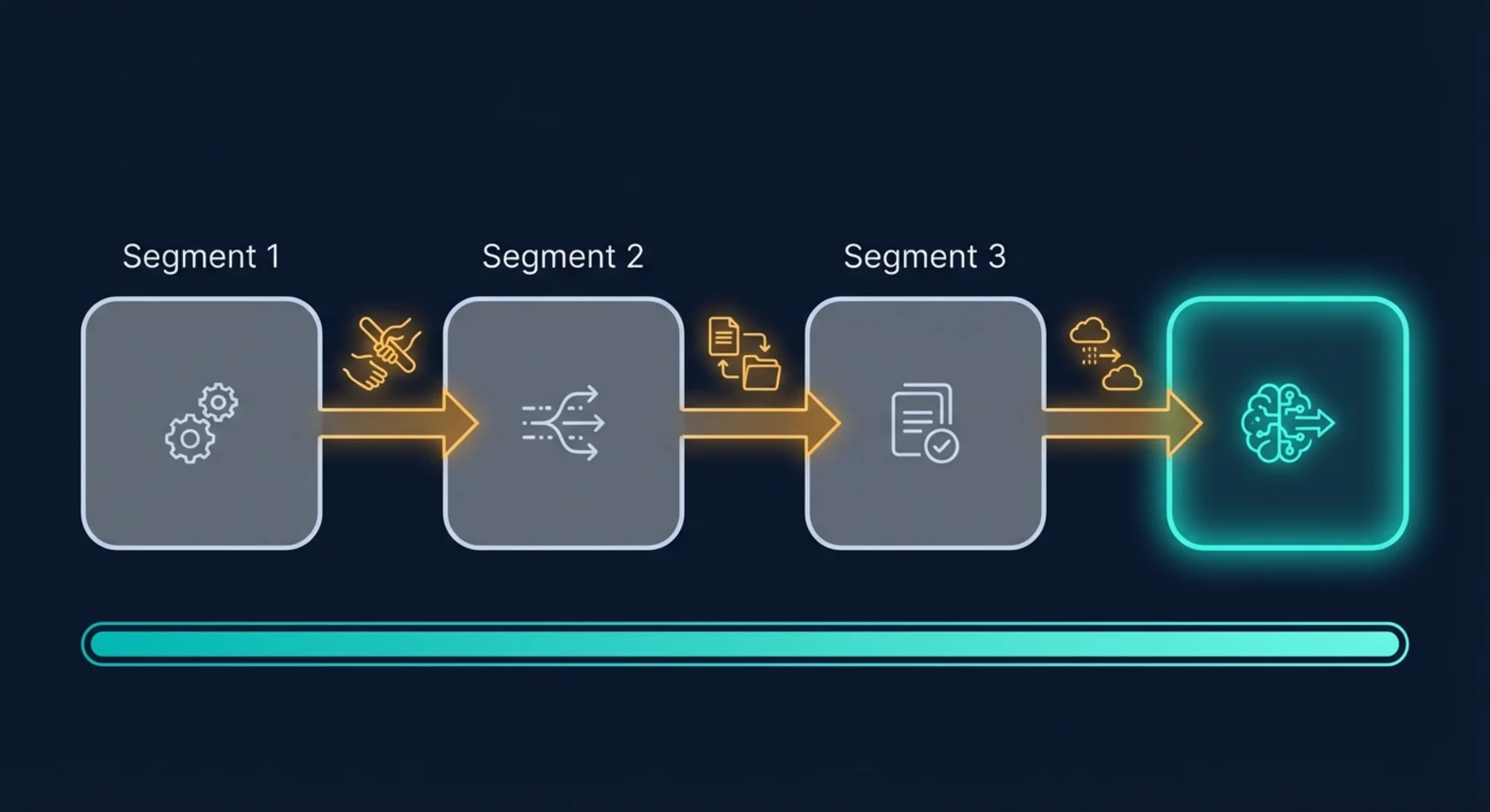
This is the mental model that unlocks long-running agents. Each "shift" is a short-lived process that:
- Knows its time limit and stops before being killed
- Writes handoff notes (persists its full state somewhere durable)
- Signals that the next shift is needed
Then a coordinator picks up that signal, starts a new process, rebuilds the context from the handoff notes, and the work continues seamlessly.
The agent doesn't know it's being relayed. The user doesn't see any interruption. But underneath, you've turned an impossible marathon into a series of perfectly manageable sprints.
The question to ask yourself
"If my process was killed right now - at this exact moment - could another process pick up the work without losing anything?"
If the answer is no, that's your first problem to solve. And the solution isn't "make the process live longer." It's "make the handoff seamless."
What this means in practice
This shift has cascading implications:
- Your state can't live in memory. Everything important must be persisted to a durable store after every meaningful step. Not at the end - continuously.
- Your agent's context must be rebuildable. If you can't reconstruct the full conversation and working state from your database alone, you can't do handoffs.
- You need a coordinator. Something needs to watch for "handoff needed" signals and start new processes. This is the heartbeat of your system.
- You need a cap. Without a maximum number of handoffs, a stuck or confused agent can relay indefinitely. Think of it as a circuit breaker - if the work hasn't finished after N segments, something is wrong and a human should look at it.
Mindset Shift 2: Disconnection Is Not Cancellation
This one seems obvious once you hear it, but it tripped us up for weeks: when a user closes their browser, that doesn't mean "stop working."
In traditional web applications, the user's connection is the session. Tab closed? Session over. But AI agents are doing real work - work the user explicitly asked for. If you're processing someone's quarterly data and they close their laptop to walk to a meeting, should all that work be thrown away?
Obviously not. But that's exactly what happens if your system treats the HTTP connection as the source of truth for "should this agent keep running?"
The mindset shift is:
The user's connection is a viewport into the work, not the work itself.
Think about it like a security camera feed. Turning off the monitor doesn't stop what's happening in the building. The work continues. When you turn the monitor back on, you catch up on what happened while you weren't watching.
The question to ask yourself
"If the user loses internet right now, does my agent keep working? And when they come back, do they see everything that happened?"
This has two parts:
1. The work must be decoupled from the connection. Once the user starts a task, the backend should be able to complete it entirely on its own. Every action the agent takes, every message it generates, every file it creates - all persisted in real-time, regardless of whether anyone is watching.
2. Cancellation must be an explicit action. "Stop this agent" should be a deliberate button click that writes a flag to your database - not an HTTP disconnect event. On every iteration of the agent's work loop, it should check: "has anyone told me to stop?" If not, keep going.
This is one of those patterns that feels like overengineering until you deploy to production and realize that WiFi drops, mobile network switches, browser refreshes, and laptop lid closes happen constantly. If any of those kill your agent, you don't have a production system - you have a demo that requires perfect network conditions.
Mindset Shift 3: Assume Everything Will Fail (and Design for Recovery)
Here's a truth that's easy to acknowledge and hard to internalize: in a system where AI agents run for hours, failures aren't edge cases. They're Tuesday.
Processes crash. Cloud providers have blips. Database connections timeout. Sandbox environments expire. Network calls fail. And the longer your agent runs, the higher the probability that something goes wrong during its execution.
The traditional approach is to try to prevent failures. Better error handling, more retries, defensive coding. And yes, you should do all of that. But it's not enough for long-running agents because:
- You can't retry a process that was hard-killed by the platform
- You can't handle an error you never saw coming
- You can't fix a crash if the crash took out your error handler
The mindset shift is from prevention to recovery:
Don't ask "how do I prevent this from failing?" Ask "when this fails, how does the system heal itself?"
Think of it like a hospital. The goal isn't to prevent all injuries (that's impossible). The goal is to have systems that detect problems quickly and respond appropriately.
The question to ask yourself
"If I turned off my entire system right now and turned it back on in 5 minutes, would it figure out what went wrong and fix itself?"
In practice, this means:
-
Regular health checks. Something should periodically scan your running agents and ask: "Is this agent actually working, or did it die without telling anyone?" Processes that have been "running" for longer than they should be are probably dead.
-
Automatic cleanup. Orphaned processes, stuck handoff signals, zombie sessions - all of these accumulate over time if you don't actively clean them up. Your system should groom itself on a regular cadence.
-
Error isolation. When Agent A crashes while processing invoices, Agent B (handling a completely different task) should be entirely unaffected. This sounds obvious, but it's surprisingly easy to build systems where one failure poisons the shared state and brings everything down.
-
Transparent status. Users should always know the truth: is their agent working, paused, failed, or waiting? Hiding failures behind "processing..." spinners erodes trust fast.
We think of this as the "come back on Monday" test. If your agents run over the weekend and something goes wrong at 3 AM on Saturday, does the system recover by itself? Or does someone get paged? For a mature production system, the answer should almost always be: it heals itself, and you read about it in the Monday morning logs.
Mindset Shift 4: The Agent's Workspace Is a First-Class Citizen
This is the one most teams discover last, but it might be the most impactful for cost and reliability: the environment your agent works in has its own lifecycle, and managing it well is as important as managing the agent itself.
AI agents that do real work need persistent workspaces. A file system with their tools installed. Running processes. Open connections. Application state. This workspace isn't just "compute" - it's the agent's desk, with all their papers and tools laid out.
The question is: what happens to that desk when the agent takes a break?
If you destroy it, the agent has to set everything up from scratch next time. That's slow and expensive. If you keep it running permanently, you're paying for an empty desk 23 hours a day. Neither option is good.
The question to ask yourself
"Is my agent's workspace alive only when work is happening - and can it wake up instantly when needed?"
The ideal lifecycle follows the work:
- Active during work → The workspace is running, and its lifetime is extended as long as the agent is doing something useful.
- Paused during idle → Between tasks, the workspace is hibernated. Full state preserved. No cost.
- Resumed on demand → When new work arrives, the workspace wakes up in the exact state it was left in. No reinstalling packages, no re-downloading files.
- Released when unneeded → If no work is expected for a long time, the workspace is fully released. It's cheaper to rebuild from scratch than to hold it in hibernation indefinitely.
The key insight is that your system needs to know when work is coming. If the agent has a schedule, the workspace can be pre-warmed. If the queue is empty and no schedule is set, the workspace can be safely released. This awareness - of what's coming, not just what's happening now - is what turns expensive always-on infrastructure into efficient on-demand compute.
What We Learned The Hard Way
These mindset shifts sound clean on paper. In reality, we arrived at each one through production incidents, confused users, and more than a few 2 AM debugging sessions. A few of the hardest lessons:
State management is the whole game. We spent 80% of our infrastructure effort on making state durable, rebuildable, and consistent. The AI part - the prompts, the models, the tool calls - that was the easy 20%. If your state isn't bulletproof, nothing else matters.
Honesty with users is non-negotiable. Early on, we hid failures behind loading indicators. "Still processing..." when the agent had actually crashed 10 minutes ago. Users lost trust fast. Now, if something fails, we say so immediately. Real-time, transparent status updates are more important than the appearance of smooth operation.
Cost surprises come from idle resources, not active ones. Our biggest infrastructure bills weren't from agents doing work - they were from environments sitting idle because we forgot to clean them up. Aggressive lifecycle management (pause when idle, release when unneeded) cut costs dramatically.
Cap everything. Maximum run duration. Maximum handoff count. Maximum queue size. Maximum retries. Without caps, every system eventually encounters a degenerate case that runs forever, retries infinitely, or consumes unbounded resources. Every "that could never happen" eventually happens.
Test the recovery path, not just the happy path. We had great test coverage for "agent processes 20 items successfully." We had zero tests for "agent crashes on item 7, coordinator restarts it, and it picks up from item 8." Guess which scenario happened more often in production.
A Framework for Thinking About It
If you're building AI agents that need to work for more than a few minutes, here are the questions to work through before you start building infrastructure:
On Time
- What's the maximum time a single process can live in your environment?
- How much of that time do you need reserved for safe shutdown?
- What's the maximum total time you're willing to let an agent work on a single task?
On Continuity
- Can you rebuild the agent's full context from your database alone?
- Is every piece of important state persisted after every meaningful step?
- Do you have a coordinator watching for work that needs to continue?
On Failure
- If a process dies silently, how long before your system notices?
- Can your system distinguish between "working slowly" and "dead"?
- Does one agent's failure affect any other agent?
On the User Experience
- When the user comes back after 30 minutes, do they see everything that happened?
- Can they cancel a running agent without ambiguity?
- Do they always know the true state of their agent (not a cached or stale state)?
On Cost
- Are you paying for environments that aren't doing anything?
- Can your system pre-warm environments when work is scheduled?
- Do you have hard caps preventing runaway resource usage?
Where the Industry Is Heading
We believe long-running AI agents are the next frontier - not chatbots that respond in seconds, but autonomous teammates that handle complex, multi-step processes over hours or days.
The teams that figure out the infrastructure layer first will have a massive advantage. Not because the AI models will be different, but because reliability, persistence, and resilience are what separate a prototype from a product. The model is the brain. The infrastructure is everything else the brain needs to actually do its job.
The patterns are emerging. The thinking is crystallizing. And the teams building real production agent systems today are learning lessons that will become the industry standard tomorrow.
We're sharing ours because we wish someone had shared theirs with us a year ago.
Building AI agents that need to work for hours? We're always up for talking shop. Get in touch - we've probably hit the same walls you're about to hit.